Este es uno de los componentes menos utilizados en Gambas. Porque? bueno, casi no existen ejemplos de como utilizarlo. La información que aparece en la ayuda de Gambas se limita solo a mostrar las propiedades, metodos y eventos de este componente, pero nada mas.
Afortunadamente alguien desarrollo un ejemplo que andaba rodando por la red desde el año 2007, pero estaba incompleto y erroneo.
Luego de mucho ensayo y error, logre conseguir que funcionaria, aqui les dejo una pantalla:
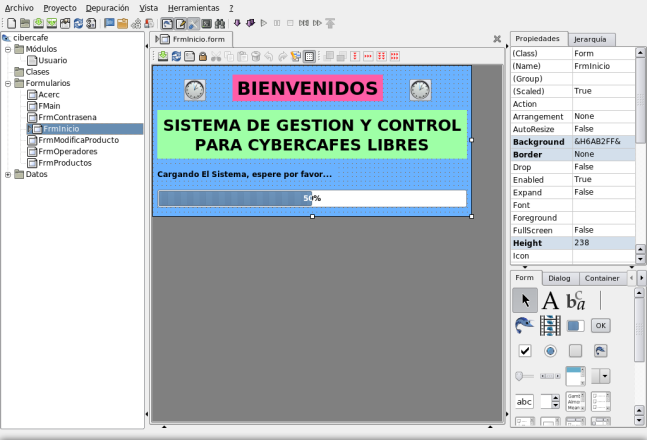
El formulario en vista de diseño, debe ser algo asi:
y el codigo es el siguiente:
PRIVATE hCon AS NEW Connection
PRIVATE hResult AS Result
PUBLIC SUB _new()
hcon.host = “localhost”
‘hcon.Port = 3306
hCon.User = “root”
hCon.Type = “mysql”
hcon.Name = “tu_bd” ‘nombre de la bd
hCon.Password = “tu_password” ‘tu password
hResult = hcon.Exec(“select nombre, password, saldo from usuarios”) ‘consulta a una tabla interna de mysql
InitReport()
DrawingArea1.Width = Printer.Width
DrawingArea1.Height = Printer.Height
Report.Zoom = 0.75 ‘para imprimir ponemos el zoom a 1
CATCH
Message(Error.Text & “\n” & Error.Where & “\n\n¿Password Incorrecto?”)
ME.Close
END
PUBLIC SUB Form_Open()
SpinBox1_Change ‘al disparar este evento, se dibuja el reporte
END
PRIVATE SUB InitReport()
DIM hCloner AS ReportCloner
DIM hLabel AS ReportLabel
DIM hField AS ReportField
DIM hHbox AS ReportHBox
DIM hEmpty AS ReportHBox
DIM hVBox AS ReportVBox
DIM hSpecialField AS NEW ReportSpecialField
Report.width = “21 cm”
Report.Height = “29.7 cm”
‘ Report.Size = “A4″
Report.Orientation = Report.Portrait ‘Report.Landscape
Report.LineStyle = line.Solid
Report.Padding = “1 cm”
Report.Resolution = Desktop.Resolution ‘Printer.Resolution
‘para imprimir cambiamos a printer.resolution
hLabel = NEW ReportLabel(Report)
hLabel.Text = “PRUEBA DE REPORTE BD CIBER KAISER”
hLabel.Height = “2.5 cm”
hLabel.Alignment = Align.Center
hLabel.Font.Size = 25
hLabel.LineStyle = Line.Solid
hLabel.FillColor = Color.LightBackground
hLabel.FillStyle = Fill.Solid
hVBox = NEW ReportVBox(Report)
hVBox.Height = “1.5 cm”
hCloner = NEW ReportCloner(Report)
hCloner.Expand = TRUE
hCloner.Count = hResult.Count
hCloner.Tag = “cloner”
hCloner.Spacing = “0.3 cm”
hVBox = NEW ReportVBox(hCloner)
hVBox.Height = “1.5 cm”
hVBox.Padding = “0.2 cm”
hVBox.LineStyle = line.Solid
hVBox.Tag = “hVBox”
hHbox = NEW ReportHBox(hVBox)
hHbox.Height = “1 cm”
hHbox.Padding = “0.2 cm”
hHbox.Tag = “hHbox”
hLabel = NEW ReportLabel(hHbox)
hLabel.Text = “Nombre:”
hLabel.Width = “2 cm”
hLabel.Font.Bold = TRUE
hLabel.Tag = “hLabel”
hField = NEW ReportField(hHbox) AS “FieldNombre”
‘creamos tantos ReportField como columnas de la bd queramos mostrar
‘con su manejador de evento correspondiente “Data”
hField.tag = “FieldNombre”
hField.LineStyle = Line.Dot
hField.Width = “5 cm”
hField.Font.Bold = TRUE
hField.ForeColor = color.Gray
hEmpty = NEW ReportHBox(hHbox)
hEmpty.Expand = TRUE
hLabel = NEW ReportLabel(hHbox)
hLabel.Text = “Password:”
hLabel.Width = “2 cm”
hField = NEW ReportField(hHbox) AS “FieldPassword”
hField.Tag = “FieldPassword”
hField.Width = “5 cm”
hField.LineStyle = Line.Dot
hField.ForeColor = color.Gray
‘hHbox = NEW ReportHBox(hVBox)
‘hHbox.Height = “0.5 cm”
hLabel = NEW ReportLabel(hHbox)
hLabel.Text = “Saldo:”
hLabel.Width = “2.2 cm”
hLabel.ForeColor = color.Red
hField = NEW ReportField(hHbox) AS “FieldSaldo”
hField.Tag = “FieldSaldo”
hField.Font.Italic = TRUE
hField.ForeColor = color.Gray
hField.Width = “5 cm”
hField.LineStyle = Line.Dot
hSpecialField = NEW ReportSpecialField(Report)
hSpecialField.Text = “Pagina $PAGE/$NPAGE”
hSpecialField.Height = “1 cm”
hSpecialField.Alignment = align.Center
END
PUBLIC SUB FieldNombre_Data()
hResult.MoveTo(LAST.Index – 1)
LAST.Data = hResult!nombre
DEBUG LAST.Data
‘CATCH
END
PUBLIC SUB FieldPassword_Data()
hResult.MoveTo(LAST.Index – 1)
LAST.Data = hResult!password
‘CATCH
END
PUBLIC SUB FieldSaldo_Data()
hResult.MoveTo(LAST.Index – 1)
LAST.Data = hResult!saldo
‘CATCH
END
PUBLIC SUB SpinBox1_Change()
DrawingArea1.Clear
Draw.Begin(DrawingArea1) ‘para imprimir, cambiamos el device a Printer
Report.Layout
SpinBox1.MaxValue = Report.count
Report.Draw(SpinBox1.Value)
Draw.End
END
Espero que sea de utilidad para todos. hasta la proxima!